Hi, I’m looking for a workaround to be able to scroll in extension mode in order to load more products on a Best Buy results page (currently you cant scroll on extension).
Why does it have to be done through the extension? Because using Distill’s cloud browser specifically for Best Buy causes several issues. Most importantly, some search results can change depending on the store you have selected, and that store selection is saved in a cookie.
Creating a cloud macro to select the store doesn’t work reliably either, because Best Buy sometimes displays a country-selection popup or random survey popups, which can break the macro.
Having access to these local/store-specific results is critical for my needs.
@outofboundary For the Macro scroll step, scrolling works in the Distill Desktop App.
Based on the details you shared, a Dedicated Cloud Device should also work for this use case. It can preserve browser state and cookies, which should help with Best Buy’s store-specific results where the selected store is saved in the session.
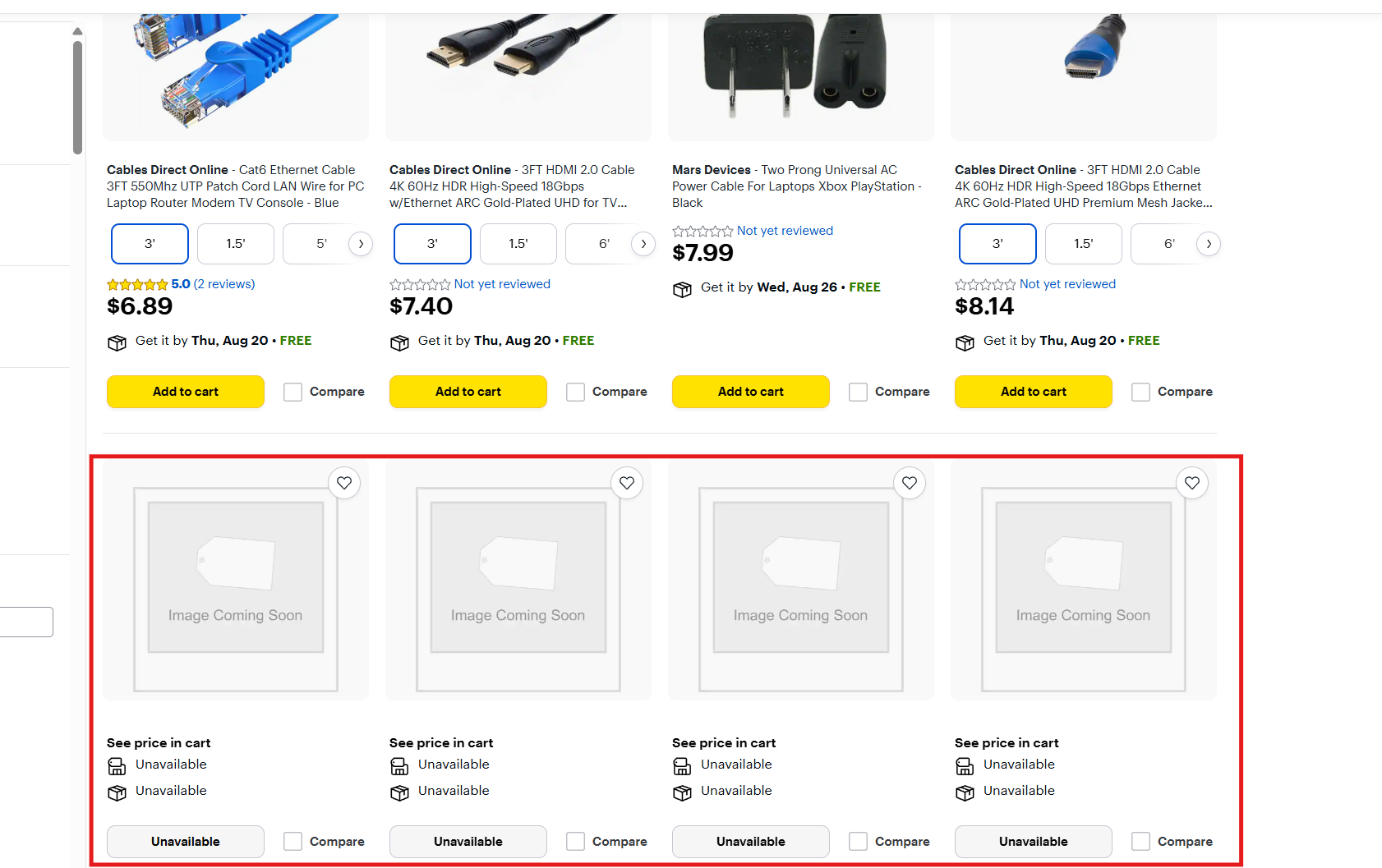
I did what you suggested, and now I’m running into another problem. I think Best Buy detects the use of proxies, and even if I actually do scrolling, they somehow prevent the rest of the results from loading, as shown in the picture. Only the first 4 products load, while all the others won’t even after scrolling.
So using a Dedicated Cloud Device doesn’t seem to work either. Any idea how I could solve this? Do I basically have to use US residential proxies for this to work?