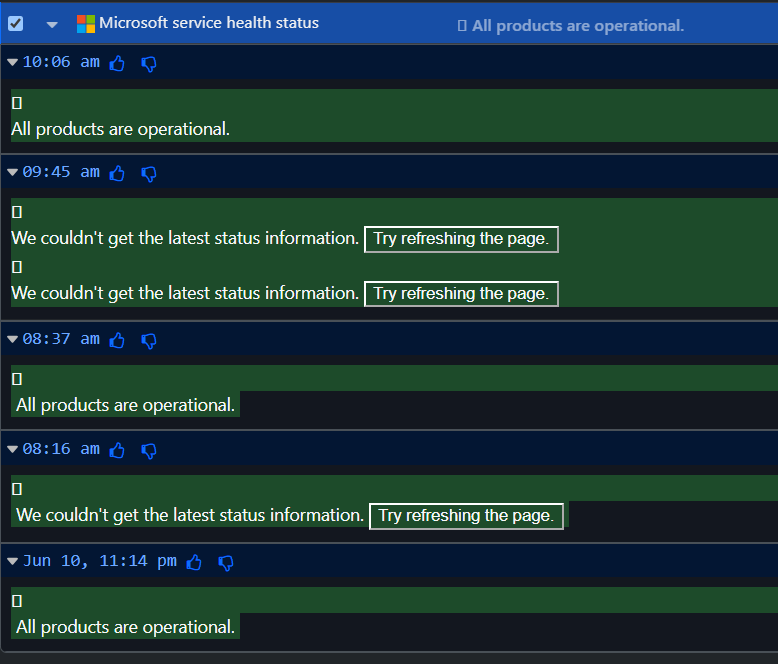
I have Distill checking Microsoft service health status every 20 minutes. It’s been working fine for over a year, but recently I started getting the error as described in the subject line.
Is there a way to prevent Distill from alerting me on that text? Subsequent checks succeed.
@brantfl Could you confirm whether this monitor is running locally using the Browser Extension?
If yes, then what you’re seeing is likely occurring when the page loads during a monitor check. At that moment, the Microsoft Service Health page is occasionally unable to fetch its data and temporarily displays the message:
“We couldn’t get the latest status information. Try refreshing the page.”
Since Distill is monitoring the content on the page, it detects this temporary message as a change and generates an alert. The fact that subsequent checks succeed and return to “All products are operational” supports this explanation.
One thing you could try is switching the monitor to Cloud Monitoring. Since the checks would then be performed from Distill’s servers rather than your local browser, it’s possible that this intermittent loading issue would no longer occur.
Suppressing the Alert: Use a condition for the text. For example: text -- does not contain -- We couldn't get the latest status information and text -- does not contain -- All products are operational.
Error out instead of recording the unwanted change: Add a Macro to validate the page’s content. It can be made to error out if the message appears “We couldn’t get the latest status information. Try refreshing the page.”.
You can also use the AI assistant to create this Macro. I used the prompt: "Error out when the text 'We couldn't get...' shows up." Attaching the macro which you can import and use.