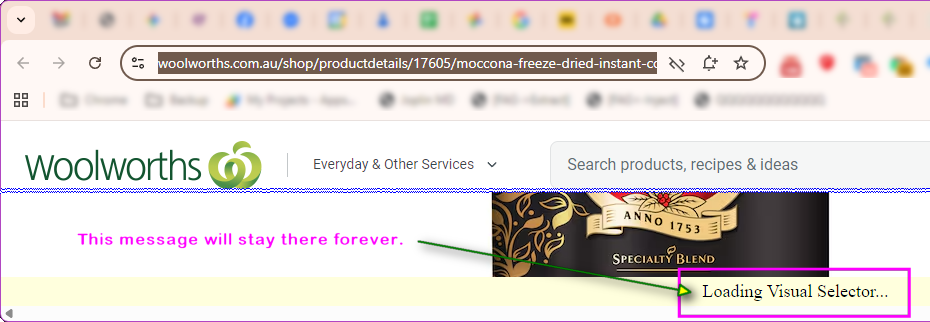
Hello - I’m having an issue where no webpages are loading in Visual Selector. I’ve tried multiple websites, and nothing is loading when I log into the webapp. I thought it was a proxy issue, so I upgraded my plan because “no proxy” was not an available option but that hasn’t fixed anything. Here is the website I’m trying to monitor with a Macro,:
But again, no websites are loading through the webapp. I’ve tried multiple internet connections.
Following up to say that AdBlcok appeared to be causing the issue, but there still no option for “no proxy”. Also, am I correct that I can’t run this on my local computer, only through the webapp/Cloud - Distill’s Servers?
I tried to reproduce the issue with AdBlock but couldn’t. It can be due to a blocklist being used that is preventing connections to the remote browser. Can you share the blocklist being used so that I can reproduce this?
Local monitors using browser extension can be used that doesn’t need a proxy. Have you tried that out?
At least in my case “Loading Visual Selector…” remaining is a distill bug, as distill doesn’t work if javascript is disabled. The message should start “Distill Loading (requires Javascript to complete)” and use Javascript to change the message to “Loading Visual Selector…”".
“Loading Visual Selector…” remains on screen permanently if JavaScript is disabled.
The html message should start as “Distill Loading (requires Javascript to complete)” and use JavaScript to change the message to “Loading Visual Selector…”". Of course you may check for JavaScript before inserting the message and then insert the correct one, either way current behaviour is flawed.
If JavaScript is disabled the checking process also fails without reporting the reason. For manually browsing the page I want Javascript on, is there a way of turning it on while Distill browses it?
On Windows 11 in Chrome, I use the Chrome Extension and Choose “go to watchlist”. I edit the monitor and click the “Open WebPage Selector”. The Device is “Any Local Device” as I want to to get local alerts via the browser. @ajitk
I realise I can change to the cloud server but then I won’t get alerts.
Thanks, yes I did disable JavaScript as mentioned above, when it is disabled this bug/feature presents itself, it would be nice if Distill was improved to handle this better. So I’m guessing there is no turn on JavaScript while monitoring option?
I don’t know what this means “you can use the webapp’s visual selector while using the local device for checks“, can you point me to a FAQ page?
it is like a chicken and egg issue. if js executed, it could have flagged any error it encountered. without the js execution, it sits there waiting for the execution.
no such issue exists in the remote browser based visual selector.
yes, it is not possible use the extension’s visual selector if js is disabled.
Sorry but both my proposed solutions don’t have a chicken/egg issue, they are designed to work around that, the first I have used in the past, the second I don’t know enough about your software.
Thanks, that does work for editing. How do I then get the monitor to run successfully?