How can I track a pdf document that has a website url - not a pdf file link. A website has been updated and the pdfs now are all website pages that contain the pdf. If I track as a webpage, will the pdf be tracked? When I open the webpage selector, the pdf does not show.
@kgray Thanks for your question.
Could you please share the URL of the webpage you’re trying to monitor?
I’d like to review how the PDF is being rendered within the page. Based on that, I can confirm whether it can be monitored or suggest the best possible workaround if the PDF content isn’t accessible to the selector.
Hi - This is a website that was just updated Publications and Forms- OLTA - Department of Housing and Community Affairs - Montgomery County, MD
For example the lease summary now links to a webpage Archival Document
Even the pdf link of of the window guard addendum goes to a webpage and not a pdf file link.
I am seeing a lot of pdf documents viewed this way now.
Thank you for looking into this!
@kgray Thanks for sharing the links, I checked them.
What’s happening here is that the PDF is no longer being opened as a standalone PDF URL from the page directly. Instead, the site now opens a webpage that embeds the PDF inside a viewer. That’s why the PDF content itself does not show up normally in the webpage selector.
The good news is that the direct PDF URL is still available, and that is the link you should use for a PDF monitor. For your example, this page:
https://www.montgomerycountymd.gov/archival-document?document=https%3A%2F%2Fassets.montgomerycountymd.gov%2Ffiles%2Flease_summ_eng.pdf&title=English%2C+archival+document
contains the actual PDF link in the document= parameter, which resolves to:
https://assets.montgomerycountymd.gov/files/lease_summ_eng.pdf
You can create a PDF monitor directly on that PDF URL, and that will monitor the document itself.
If you come across other pages like this, you can usually get the direct PDF link in either of these two ways:
-
Check the
document=parameter in the Archival Document URL -
Open the page in your browser, go to Developer Tools → Network, filter for
.pdf, and copy the PDF request URL from there
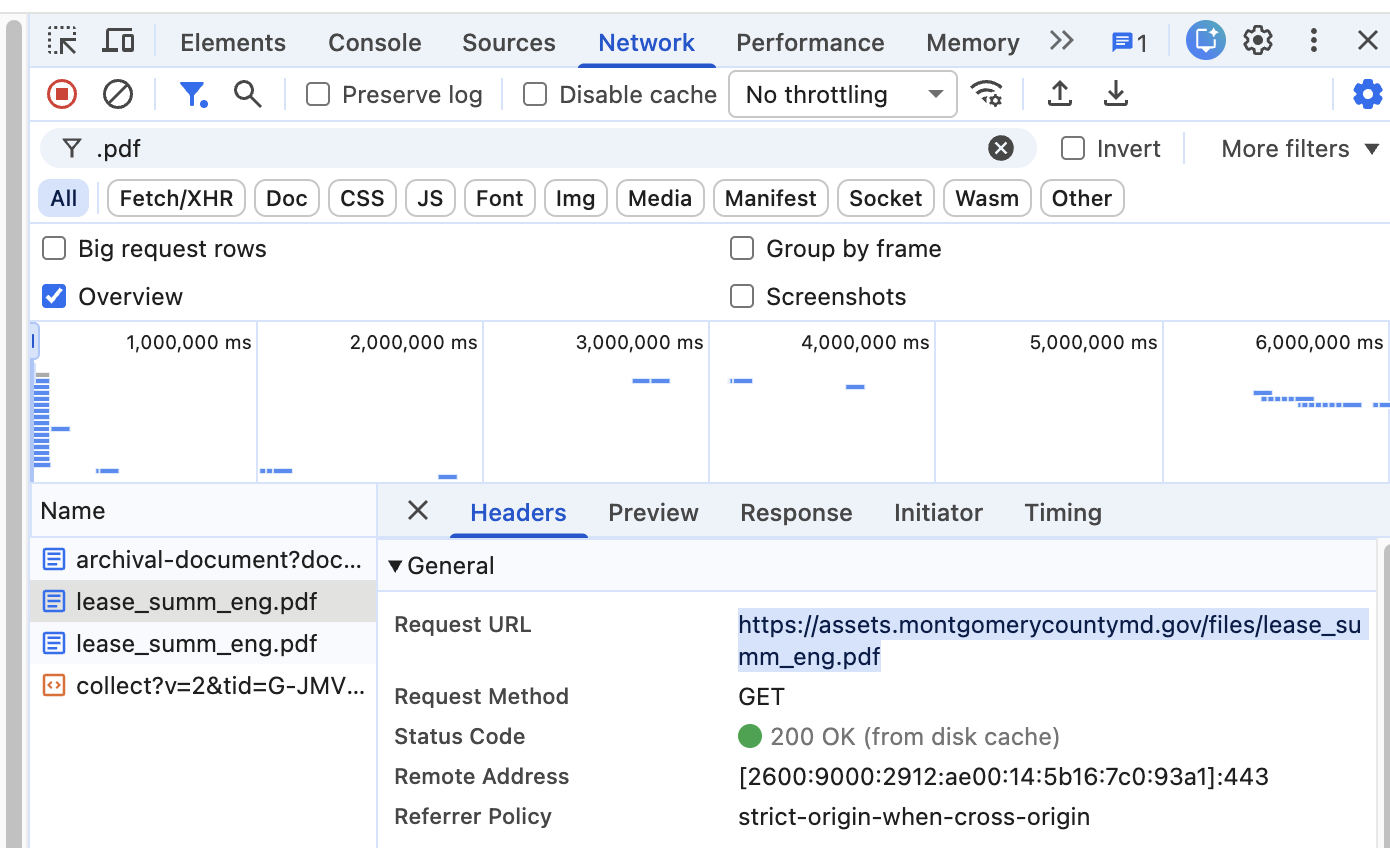
So in this case, I’d recommend monitoring the direct PDF URL, not the wrapper webpage.