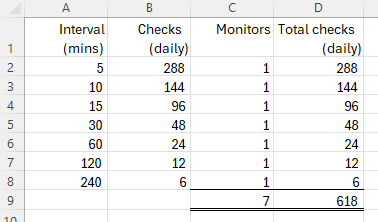
Hi there, last month I ran out of checks so this month I’m trying to plan things out better. I’ve read the docs and for my 7 monitors, at these frequencies, I /think/ that I should be using around 620 checks/day.
Here is my list of 7 monitors and their frequency:
Can you please tell me if I’m understanding this right?
This math assumes that all the checks take <10secs to execute so count as 1x. I do understand that if a check takes 10-20 secs then it counts as 2s, so in theory this total # of checks/day is maybe 2x the 620, or around 1200 checks/day. FYI the docs do not state that slower checks (20-30secs, 30-40secs, etc.) count as 3x, 4x, etc.
@pdrayton the cloud checks are counted in units of 10 seconds. so, a check taking 10s-20s will be counted as 2 checks and another taking 30s-40s will be counted as 4. to get a general idea, you can track daily usage and adjust the check intervals accordingly.
note that you can also use crontab schedule to limit checks to a specific time slot. one common pattern is to perform checks only during the day – it can be a great way to optimize the checks.
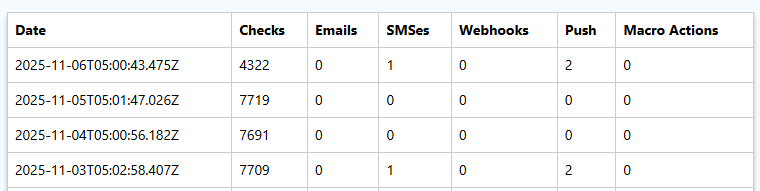
Hmm, if the checks are counted like that, then how are my 7 monitors, which should produce under 700 checks / day, consuming 4000-7000 checks per day?
These have been running untouched, as a test, since I posted this question on Nov 3 (in UTC). So the last 3 days were just the same 7 tests, running at these frequencies. 20k “checks” consumed for 7 simple no-Javascript, no-page-styles, no-ads checks at infrequent times?
Oh SNAP! I just figured out why the heck I’m getting charged 10x per check, and it actually is documented, so the mistake is on my end.
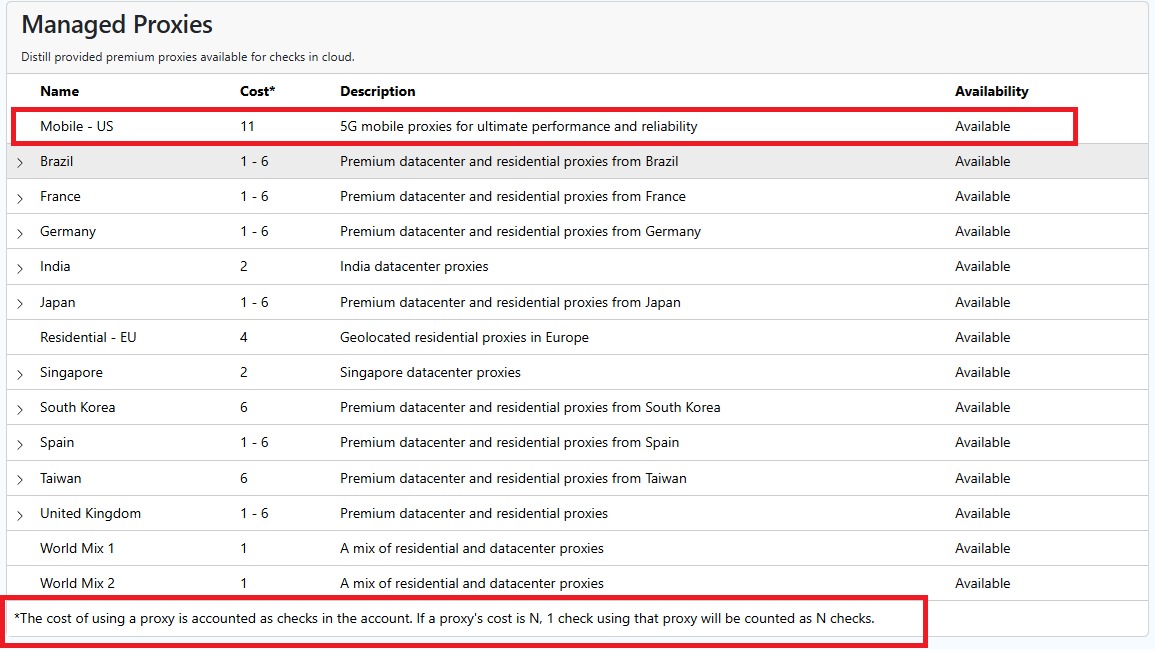
All the monitors were configured as “Proxy - Mobile - US”, which was the only way that I could ensure that the checks were originating in the US. I didn’t care about mobile, just needed them to come from the US so that they were checking the availability of products in the US store, not some other store such as the Canadian one.
But the docs do state that the “11” in the dropdown was there to warn me that checks via that proxy were going to incur an 11x cost. So… it was my mistake, not a problem with Distill.io!
Here’s the bits on the documentation that I didn’t read carefully enough:
thanks for the update @pdrayton. the shared pool uses “us” as the default location for proxies. that should work for most common use cases. but a problem with geolocating an ip address is that it is just an entry in a database and there are multiple databases on the net and not all of them are upto date. this mismatch can be more common with a datacenter ip.
does the website being monitored offer a way to choose your preferred location? if yes, using a dedicated cloud device is a much more cost-effective option to get checks from the location you need.
other options for cloud monitoring are to use “residential proxy” or a custom proxy (option available in flexi) for more control over where the checks happen from.
if local monitoring is an option, it is one of the best ways to monitor the web.
let me know what you think of if you have any questions.