Hi, I’ve been using macros to reach forms that are sitting within an “expand” bar within a website. As the website has recently been updated, multiple monitors set up to track different forms within the website has run into errors as they are unable to reach the form. I’ve figured out that once the macro is updated, the monitor will work as expected. When testing the monitors to ensure they work fine with the updated macro, I noticed that the macro would appear in the first instance and then dissapear once the monitor page loads. I am also unable to search for the macro through the macro search bar within the the monitor. I’ve attached a short recording for your reference. Please advise how should we go about this instead of having to create multiple new macros.
@smokeballaulp thanks for reporting the issue. the dropdown in the visual selector fillters the list that has already been loaded (the top 10 for that website). as a quick workaround, you can search and select the macro from the options page as shown below. it searches all applicable macros for that url. once you have selected the macro, open the visual selector like you always do.
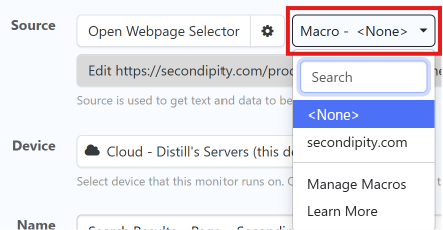
in the meantime, we will fix the search in the visual selector and let you know.