Hey I was wondering is there a way when clicking links in the Distill Web Monitor Application it can open it in my default web browser? Instead of the browser inside Distill
@tesalaw thanks for reaching out and sharing the feedback. We can offer an option to open link in the OS’s default web browser instead of the inbuilt one. Note that the reason the desktop’s browser is used by default is so that you can use the same session that is used for checks. This is important for most cases that require one to stay logged in. Cheers!
How do I open the links in the default OS browser? Or is there not a feature yet. Ty
It has been added yet. We will publish it in the changelog and announce it here once it is supported.
It’s really strange. According to this post, the relevant feature seems to have been added. However, I can’t find it in the settings of the desktop version. Could anyone tell me where to enable this feature in windows 10?
@MingHanShan Yes, this feature was added.
In the Distill Desktop App, when a webpage loads inside the built-in browser, you can click the highlighted button shown in the screenshot below (top-right corner) to open that website in your system’s default browser.
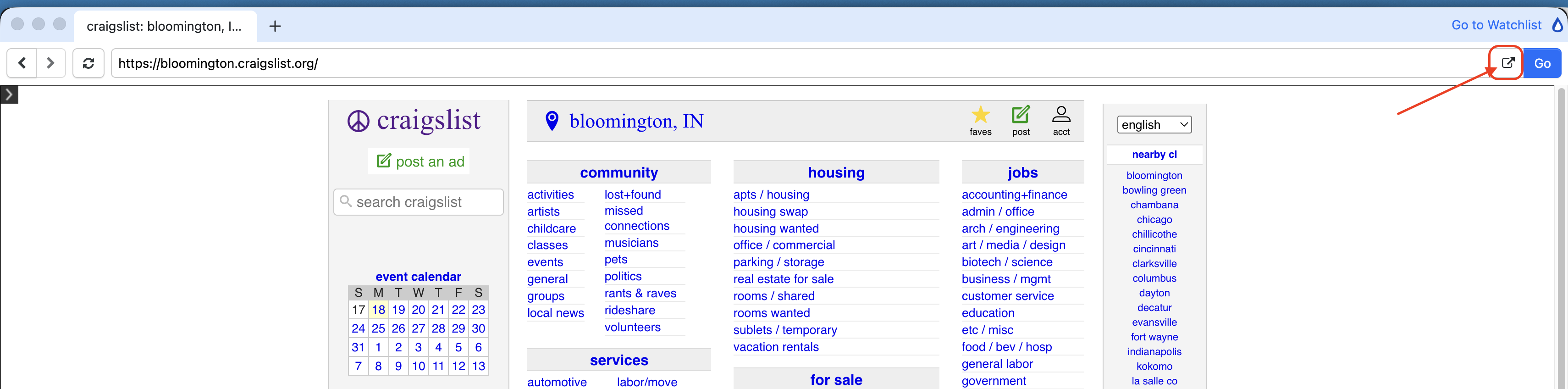
It is available directly from the Desktop App interface while viewing the page.