Hi, I’m seeing an issue where Distill continues triggering an alert even though my numeric conditions should fail when using a comma-formatted number.
The monitored text is:
#105,665 in Clothing, Shoes & Jewelry ()
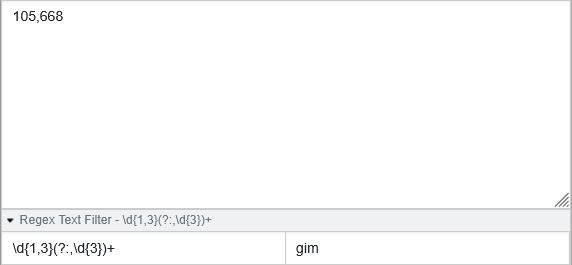
I extract the number using:
\d{1,3}(?:,\d{3})+
This correctly returns 105,665.
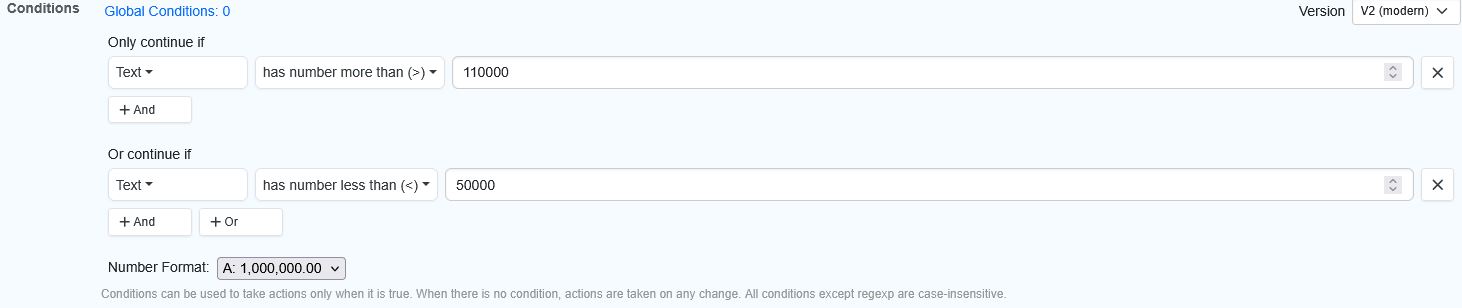
My conditions are:
Only continue if number > 110000
Or continue if number < 50000
Number Format: 1,000,000.00
Despite this, Distill still fired for #105,665 which is not greater than 110k and not less than 50k.
It seems Distill may be interpreting comma numbers incorrectly (possibly splitting them), or the condition is not being applied to the regex-extracted value.
How can I ensure the numeric condition evaluates only the extracted comma-formatted number?
@modernjp11 From what you’ve described, it’s possible the issue lies in how the conditions are being applied or interpreted in your current setup. Sometimes, even small formatting or placement issues in the condition logic can lead to unexpected evaluations. Also, just to clarify upfront: Distill correctly interprets comma-formatted numbers (like 105,665) as long as the number format is set appropriately — so it’s unlikely that the commas are causing the issue here.
Here’s what we suggest:
Use the “Test Conditions” button to preview how your current conditions are evaluated. This can help identify whether the conditions are behaving as expected.
If possible, please send us a screenshot of the Conditions setup for your monitor. This will help us validate whether the logic is correctly applied or if any tweaks are needed.
@modernjp11 Try running this monitor using Distill’s Chrome extension, you will be able to access the “Test Conditions” feature over there. Also, can you share us the screenshots of your change history which shows that you got alerted for 105,665. It will help us debug further.